To forward an email for Gridworks IT to review, here's how you can do that in the way they recommends:
Outlook Classic Users:
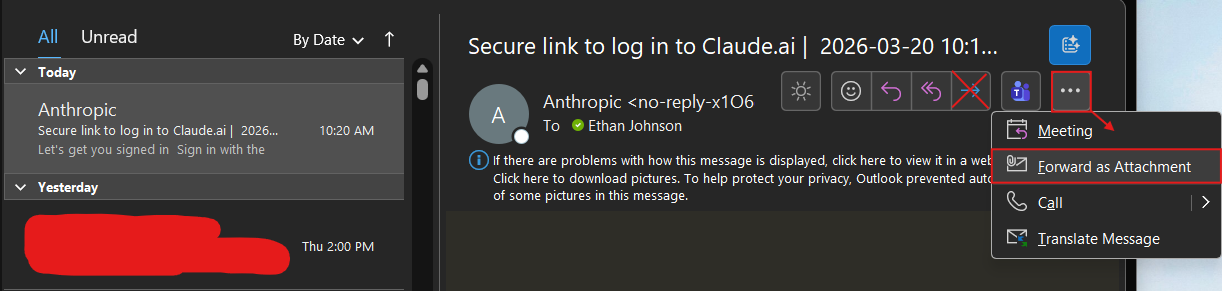
Start by either selecting an email in your mailbox list, or double-clicking an email to open it in its own separate window. To the far-right (beneath the top 'Home' ribbon row of functions like "New Email"), you'll find an ellipses button adjacent to a Microsoft Teams icon and a blue right arrow that says "Forward." Click this ellipses, and choose "Forward as Attachment" (see snippet below).
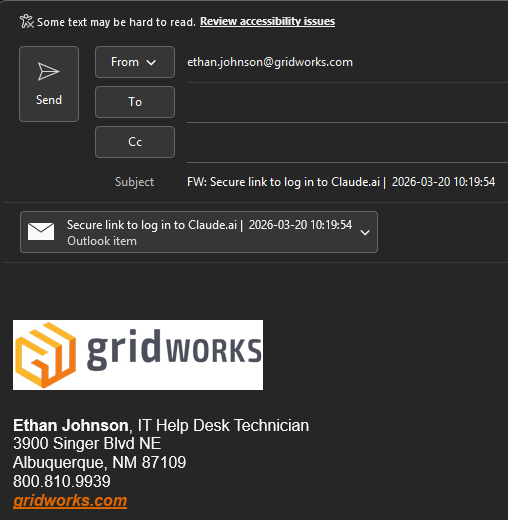
This will compose a new email with that email attached as an Outlook item, and the subject line set to the name of the email you received. Send this to ITHelp@gridworks.com with any accompanying message you wish to include, and an IT member will get back to you with confirmation on the legitimacy of the email, and direction on how to proceed.
New Outlook / Outlook Online Web Application (O.W.A) users:
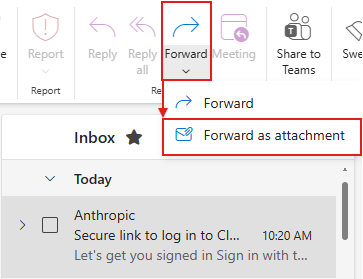
Start by either selecting an email in your mailbox list, or double-clicking an email to open it in its own separate window. The easiest way to forward the selected email as an attachment is by clicking the downward arrow on the "Forward" drop-down menu (see snippet below), and choosing "Forward as attachment."
You can also use the same method that Outlook Classic users do, which is to click the ellipses at the far-right of the email > Other reply actions > Forward as attachment (see snippet below).

This composes a new email with the email in question attached as an Outlook Item. Send this to ITHelp@gridworks.com with any accompanying message you wish to include, and an IT member will get back to you with confirmation on the legitimacy of the email, and direction on how to proceed.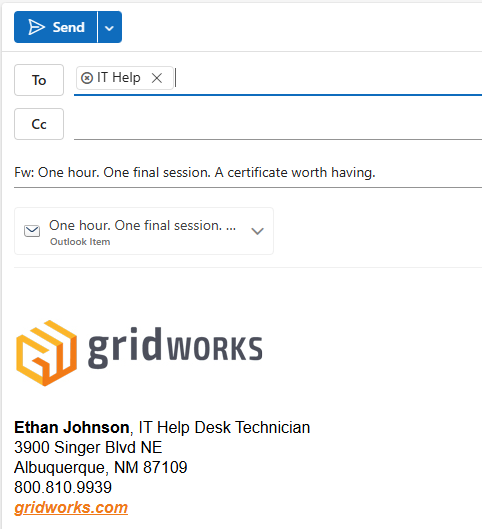
If you have any questions or encounter any issues while trying to follow these steps, please reach out to your IT department for assistance.
Was this article helpful?
That’s Great!
Thank you for your feedback
Sorry! We couldn't be helpful
Thank you for your feedback
Feedback sent
We appreciate your effort and will try to fix the article